
JoyCon Droid (Requires Root & Magisk)1.0.91.2 - Get APK
You'll be able to download in few seconds.
Publisher Description
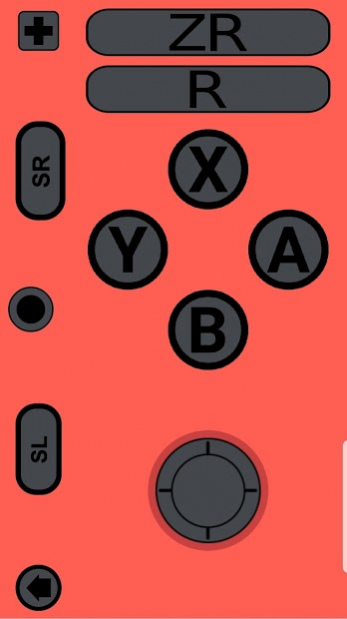


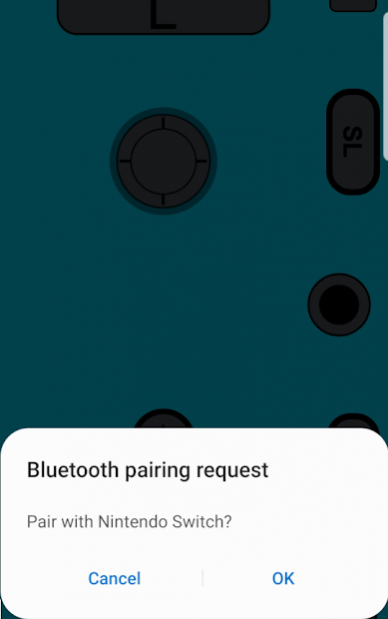
An application that transforms your smartphone into a Left JoyCon, Right JoyCon, or Pro-Controller.
⚠️⚠️⚠️ After Firmware Version 12.0.0 This application Requires Root and Magisk Module ⚠️⚠️⚠️
⚠️⚠️⚠️ If you do not know what **Root** or **Magisk** is please stay away ⚠️⚠️⚠️
⚠️⚠️⚠️ For more detail on installation and requirements check: https://joycon.gitbook.io/ ⚠️⚠️⚠️
This application or any related software comes as it is and does not have any guarantees.
**Please note that there are certain devices which the application may not be fully functional on. Kindly report which device model the application is not working properly on via Discord or Email**
**The application requires that your device has a Bluetooth HID Profile, which Android Pie (9) is needed for. To verify if your device has the necessary profile, please use the following checker: https://play.google.com/store/apps/details?id=com.rdapps.bluetoothhidtester **
**Provided that the application does not perform as desired, please get in touch with us before leaving a review. Poor ratings decrease the chance that app support will be expanded to your device.**
*This application is currently in its Alpha Stage of development*
JoyCon Droid is an application perfect for users who own a NX Console but do not want to spend extra on a JoyCon. The application emulates a JoyCon so you can control your NX Console with it. Furthermore, the application lets you connect your USB gamepad to your phone, which can act as a bridge to control the Switch.
This application requires Android Pie (9) or higher to operate. Features include:
-Pairing with Switch
-Accelerometer
-Gyroscope
-Custom Gamepad Interfaces
Instructions and Support:
Switch > Settings (Gear Icon)
Controller and Sensors > Disconnect Controllers
Controller and Sensors > Change Grip/Order
Open JoyCon Droid > Tap Left JoyCon button.
Tap okay if asked to turn on Bluetooth
Tap Sync button between left and right shoulder buttons. (May require several taps)
Tap okay at advertisement notification (300 seconds)
Pair once Switch requests to connect
After the JoyCon shows on the Switch, press both left and right shoulder buttons.
Let me know if you have any issues, questions, or concerns.
Join our Discord: https://discord.gg/5SFhf5C
About JoyCon Droid (Requires Root & Magisk)
The company that develops JoyCon Droid (Requires Root & Magisk) is DeepBlue Labs. The latest version released by its developer is 1.0.91.2.
To install JoyCon Droid (Requires Root & Magisk) on your Android device, just click the green Continue To App button above to start the installation process. The app is listed on our website since 2021-05-24 and was downloaded 0 times. We have already checked if the download link is safe, however for your own protection we recommend that you scan the downloaded app with your antivirus. Your antivirus may detect the JoyCon Droid (Requires Root & Magisk) as malware as malware if the download link to com.rdapps.gamepad is broken.
How to install JoyCon Droid (Requires Root & Magisk) on your Android device:
- Click on the Continue To App button on our website. This will redirect you to Google Play.
- Once the JoyCon Droid (Requires Root & Magisk) is shown in the Google Play listing of your Android device, you can start its download and installation. Tap on the Install button located below the search bar and to the right of the app icon.
- A pop-up window with the permissions required by JoyCon Droid (Requires Root & Magisk) will be shown. Click on Accept to continue the process.
- JoyCon Droid (Requires Root & Magisk) will be downloaded onto your device, displaying a progress. Once the download completes, the installation will start and you'll get a notification after the installation is finished.
Program Details
System requirements
Download information
Pricing
Version History
version 1.0.91.2
posted on 2021-05-24
Custom UIs Fix
version 1.0.91.1
posted on 2021-05-09
version 1.0.90.3
posted on 2021-04-08
Grapichs Changes
version 1.0.81.20
posted on 2020-12-13
External Storage is set for default location
version 1.0.81.18
posted on 2020-11-17
Request Legacy External Storage
version 1.0.81.7
posted on 2020-11-06
Bug Fix
version 1.0.81.3
posted on 2020-06-18
NFC Emulation Fix
version 1.0.70
posted on 2020-05-15
Bug Fix With Payments
version 1.0.69.7
posted on 2020-04-27
Fixed Minor Bugs
Improved Color Picker
Added Translations
version 1.0.69
posted on 2020-04-25
Selectable Color For JoyCons
Settings for Gyroscope and Accelerometer
Setting for Amiibo
Disclaimer
External Download
We do not host JoyCon Droid (Requires Root & Magisk) on our servers. We did not scan it for viruses, adware, spyware or other type of malware. This app is hosted by Galad and passed their terms and conditions to be listed there. We recommend caution when installing it.
The APK Download link for JoyCon Droid (Requires Root & Magisk) is provided to you by apps112.com without any warranties, representations or guarantees of any kind, so access it at your own risk.
If you have questions regarding this particular app contact the publisher directly. For questions about the functionalities of apps112.com contact us.
